What is a goal metric? #
Every goal should have an identifiable situation where it can be judged as being reached or completed. For example, if a goal is to reduce body weight then the goal will be assessed as complete when the target weight is reached. Or if the goal is to complete a marathon run, the goal is deemed complete when the user actually takes part in and completes a marathon race.
A metric captures how and what ‘completed’ looks like. A metric can be specific number target or just a ‘done’ outcome (e.g. like completing a marathon race).
Metric form #
Good Day supports two forms of metrics:
- Lag metrics are used to define the goal finish line
- Lead metrics are used to track progress whilst a goal is in progress.
A goal that is quantifiable should have at least one ‘lag’ metric, and ideally, one or more ‘lead’ metrics that can be used to track progress.
Goal metric types #
There are different types of metric supported:
- Done/completed: when the goal is associated with completing a specific action (e.g. like the marathon race) then use this metric to capture when the action is recorded.
- Percent completed: if a goal’s progress can be estimated in terms of proportional progress, then use a percent completed metric to record the graduated progress towards goal completion
- Tasks completed: if the goal has an action plan that is primarily concerned with tasks, then use the tasks completed’ metric to capture progress
- Task story points: if the goal has an action plan that is primarily concerned with tasks, and the tasks have been quantified with story point values, then use this metric to record goal progress.
- All habits adopted: if the goal has an action plan where the content is mainly associated with habits, then use this metric type.
- Value: if the goal is associated with reaching a target value (e.g. a target body weight), then use a value metric to define the target value.
- Accumulator: if the goal is associated to build up to a target value (e.g. cycle 1,000 km in a month) then use the accumulator metric type.
Goal metric view

The goal metrics form has two sections, one for ‘lag’ metrics, and a second for ‘lead’ metrics.
To add a new lag metric, click on the ‘+’ button in the lag section header.
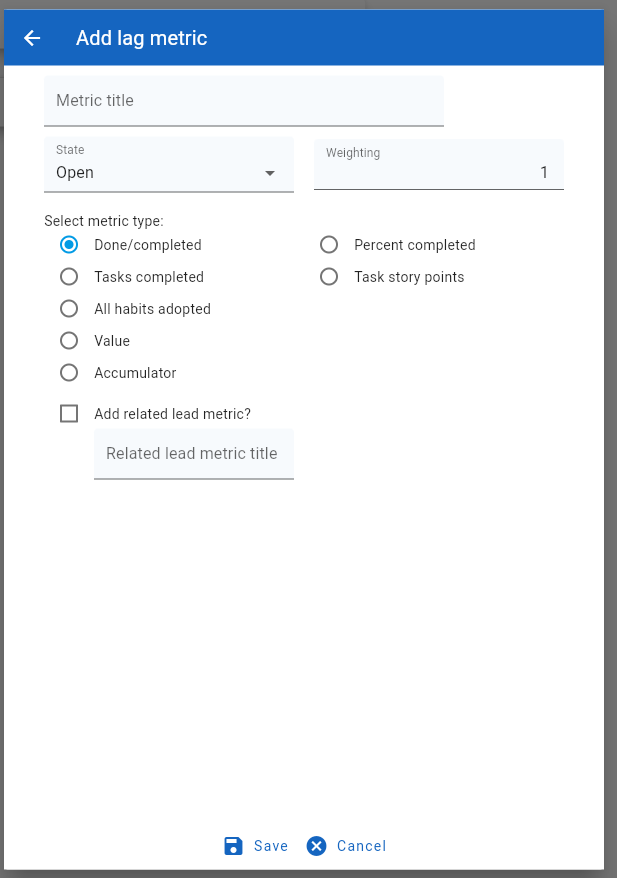
This form requires that the user:
- Define a title for the new lag metric
- Set the metric state (open by default)
- Give the metric a weighting value
- Choose the metric type
Optionally define whether a matching lead metric should be created to compliment the lag metric
There are seven different types of metric
1). Done/completed metric.
Use this metric when the goal is related to completing a one-off action (e.g. finishing a marathon race). For this type of metric, the user must manually define when the metric state to ‘done’.
2). Percent completed metric
Use this metric type where it is possible to assess progress during the lifetime of the goal’s activity. For example, when building a new house, it will be possible to assess the relative level of progress towards completion, e.g. 20% when the house is water-proof, 70% when the electrics are installed and approved. For this type of metric, the user must manually enter the progress value .
3). Tasks completed metric
Use this metric when the goal action plan is mainly comprised of tasks. This metric has the advantage that progress will be automatically calculated based on the state of the associated tasks. For example, if 40% of the action plan tasks are complete, then the metric will report as 40% complete.
4). Task story points metric
Use this metric when the goal action plan mainly comprises tasks, and each task has a story point value that represents the effort required to complete it. Using task story point assignments is recommended, and will provide a more realistic assessment of metric progress than simple task count. This metric has the advantage that progress will be automatically calculated based on the state of the associated tasks and there story point totals. For example, if 40% of the action plan tasks are complete and these tasks have a story point total that equates to 55% of the overall point total, then the metric will report as 55% complete.
5). All habits adopted metric
If a goal is related to a desired change in behaviour then the action plan will usually include one or more habit associations. In that case, the goal should employ the ‘all habits adopted’ metric. This type of metric has the advantage that progress is automatically calculated from the individual habit adoption scores.
6). Value metric
A value metric is used to capture a quantifiable goal target, such as running a marathon in less than 3h 30m, or reducing body weight to 90 kg, or saving $10,000

The value defintiion includes:
- Value type: either: time, distance, weight, volume, money, count or amount.
- Value direction: either ‘up to’ or ‘down to’
- Value: the target number (e.g. 90 in 90kg
- Value unit: the target number unit (e.g., kilograms in 90kg)
Recording progress for a value unit requires that the user manually enter the metric value.
7). Accumulator metric
This is similar to the value metric in that a target value is defined, but in this case, progress is taken as being an accumulation of progress steps towards reaching the target value.
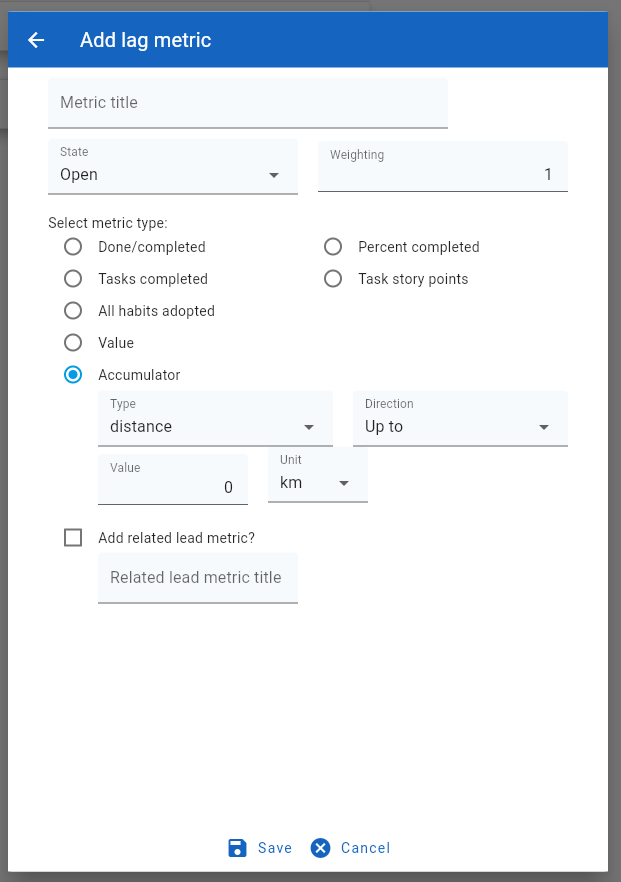
For instance, an accumulator metric example might be “cycling 1,000km”. In this case, each progress value input by the user would be taken as the number of kilometres cycled on a specific date. The metric would be completed when the sum of all progress inputs matched or exceeded the target value.
Linking a related lead metric #
When creating a new lag metric, the form allows the user to define a related lead’ metric. Lead metrics are usefl for all lag metric types other than ‘done/completed’.
Lead metrics #
A lead metric is used to track progress on a goal.
There are six types of lead metric:
- Percent complete: this is used to capture the progress state of a goal between a value of 0% and 100%. The progress value must be manually input by the user.
- Tasks complete: this is used to display the number of tasks associated with a goal action plan that are completed.. The progress percentage is automatically calculated from task state.
- Task story points: this is used to display the goal progress by measuring the total story points of the tasks that have been completed against the total story points of all tasks associated with a goal action plan.
- Habits adopted: this is used to display goal progress based upon the adoption status of habits linked to a goal via the action plan. This value is automatically calculated.
- Value: This metric captures a snapshot value and is used in association with a related value lag metric to determine whether a goal has been achieved. The user must enter the value metric inputs manually.
- Accumulator: This metric captures an incremental value towards the achievement of a related lag metric that is also an accumulator.
To create a new lead metric click on the ‘+’ button found on the ‘Progress/lead metrics’ heading

Each lead metric must have:
- A unique title
- An associated lag metric
- A selected metric type
- A progress check frequency
Linking a lead metric to a parent lag metric is useful in that this can be used to automatically update the status of a lag metric.
Lead metrics are used as the display content for showing goal progress.